3D Lighthouse Tower Model CNC File
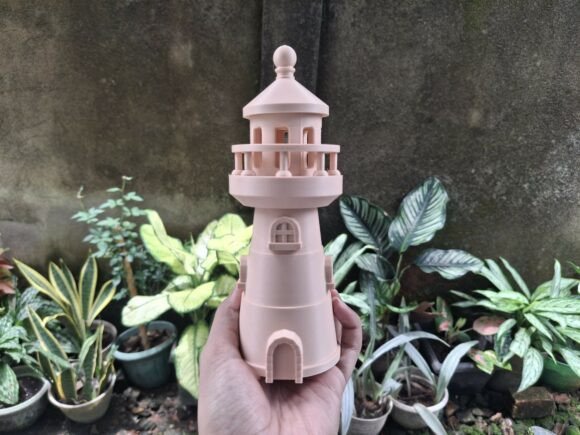
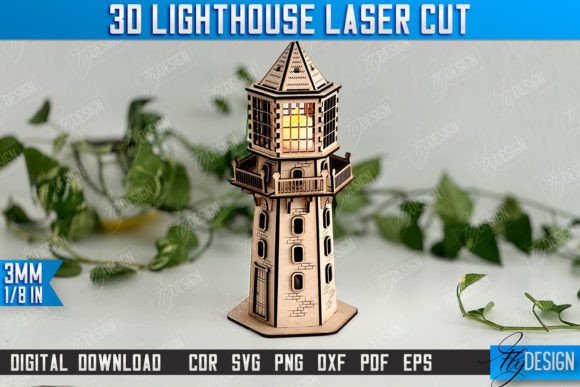
In the realm of modern graphic design and digital fabrication, the boundary between 2D planning and 3D realization is increasingly blurred. For creators seeking to add tangible depth to their projects, a high-quality 3D Lighthouse Tower Model CNC File offers a sophisticated solution that bridges the gap between abstract concept and physical object. This isn't just a simple shape; it is a meticulously crafted vector asset designed to bring maritime aesthetics into your workspace through precision cutting and engraving.
When integrating such assets into your design workflow, understanding the technical specifications is as crucial as appreciating the visual impact. These files are optimized for laser cutting machines, allowing designers to produce intricate details that would be difficult to achieve by hand. The model serves as an excellent example of how digital assets can enhance branding, create unique merchandise, or serve as striking decorative elements in interior design spaces.
Understanding the Technical Specifications
The versatility of this product lies in its comprehensive file package. Each purchase provides a zip archive containing five distinct formats: SVG, EPS, PNG, PDF, and DXF. This variety ensures compatibility across various software platforms, from Adobe Illustrator and CorelDRAW to specialized laser cutting software like LightBurn and RDWorks. However, not all file types perform equally well in every application.
For users working with LightBurn, a common recommendation is to utilize the DXF file format rather than SVG. Experience shows that LightBurn can sometimes distort dimensions when processing SVG files, which may lead to inaccurate cuts. By switching to DXF, you ensure that the scale remains true to the original design, preserving the integrity of the lighthouse’s proportions. Always verify that your cutting machine and software are compatible with these vector formats before beginning production.
Cutting vs. Engraving Instructions
To achieve the best results, pay close attention to the line codes embedded within the vector files:
- RED lines indicate paths designated for CUT operations.
- BLACK lines indicate paths designated for ENGRAVE operations.
This color-coding system simplifies the setup process, allowing you to quickly assign power and speed settings appropriate for each task. Red lines typically require higher power and slower speeds to slice through material, while black lines use lower power to etch surface details without penetrating the material fully.
Applications in Branding and Visual Design
From a graphic design perspective, a lighthouse symbolizes guidance, safety, and resilience. Incorporating a 3D Lighthouse Tower Model Marine Design CNC File into your creative projects can significantly strengthen brand identity, particularly for businesses in the maritime industry, coastal tourism, or navigation services. The three-dimensional aspect adds a layer of professionalism and premium quality that flat graphics often lack.
Beyond branding, these models are invaluable for creating custom signage, packaging design elements, and interactive exhibits. In UI/UX design, similar geometric principles can inspire interface layouts that feel structured and reliable. For editorial design, a physical model can serve as a centerpiece for feature articles about exploration or engineering. The ability to produce both cut edges and engraved textures allows for a rich visual hierarchy, where contrast and texture guide the viewer’s eye effectively.
Enhancing Creative Projects with Precision
Whether you are designing social media graphics that promote a new product launch or creating physical merchandise for a boutique shop, the clarity of your source files matters. High-resolution PNGs provide immediate visual previews, while vector formats (SVG, EPS, DXF) ensure scalability without loss of quality. This scalability is critical for maintaining consistency across different mediums, from small business cards to large wall murals.
If you require specific adjustments, such as alternative color palettes for PNG files or different file types tailored to your specific hardware, direct communication with the creator is encouraged. Customization ensures that the asset fits seamlessly into your existing brand systems and design goals. Remember, thoughtful design choices—supported by robust, compatible digital assets—elevate the overall user experience and professional presentation of your work.
By leveraging these precise CNC files, you not only save time but also elevate the aesthetic quality of your output. As design trends continue to favor tactile experiences and hybrid digital-physical interactions, having access to versatile, high-fidelity models becomes an essential part of a modern designer’s toolkit. Stay connected to discover future releases that expand your creative possibilities.